Design Your Schedule: Building an AI Assistant for Emergency Physicians
Emergency medicine scheduling doesn't have to feel like chaos. I built an AI assistant that understands my constraints and helps me generate optimized QGenda requests each quarter. This post breaks down the tiered priority system and skill architecture.


Emergency medicine scheduling is complex. Not because anyone wants it to be, but because the constraints are genuinely hard to solve. Our schedulers work incredibly hard to balance hundreds of competing constraints, and even their best efforts sometimes result in night shifts that leave you stranded mid-week. Quick turnarounds that wreck your sleep.
Our department uses QGenda for scheduling. It works, but it wasn’t designed with emergency physicians in mind. The software optimizes for coverage, not for the humans providing it. The result? Schedules that technically fill all the slots but leave you feeling fragmented. Night islands. Rapid turnarounds after nights. Chunks of time off that land on the wrong days.
I’ve spent years trying to “go with the flow”. Trading shifts when needed, but mostly just hoping the algorithm would be kind. But hope isn’t a strategy. So I asked a different question: what if I could build an AI assistant that understood my life and helped me submit more thoughtful, strategic requests, making me a better participant in the scheduling process?
The Problem with Request-Based Scheduling
Every quarter, we get a budget for scheduling requests. Full days off, partial days, and protected call days. The challenge isn’t the budget itself. It’s figuring out how to spend it wisely across competing priorities.
Do I protect my daughter’s taekwondo tournament? Or bank that request for a potential conference? What about building in recovery time after a string of nights? And where do my “Design Tuesdays” fit in? That’s my protected academic time, and it matters.
These aren’t simple decisions. They require holding multiple constraints in your head at once while predicting the final schedule. It’s the kind of problem that feels like it should be solvable with better tools.
How Might We Design a Smarter Approach?
The rise of AI agents gave me an idea. Specifically, Claude’s new Agent Skills. What if I could encode all my scheduling logic into a skill that Claude could use to help me think through each quarter?
Agent Skills are modular instruction packets. Think of them as training documents that teach an AI how to do a specific task. OpenAI has something similar with Custom GPTs, but Claude’s approach extends across the platform with a key feature: progressive disclosure. The AI is aware of the skill without loading everything into memory until it’s needed. This preserves the token budget and keeps things efficient.
I set out to build a scheduling assistant skill. Here’s how I structured it.
A Tiered System of Constraints
The core of my approach is a tiered constraint architecture. Not all scheduling needs are equal, and the system needs to know which ones to protect first.
Tier 1: Must Have Off
These are non-negotiable. Vacations already booked. Family commitments. Medical appointments. If something is in Tier 1, the AI knows to protect it with a full-day request, no exceptions.
Tier 2: Standing Preferences
These are recurring priorities that define my ideal work rhythm. For me, that’s Design Tuesdays, a weekly block I protect for academic and creative work. It also includes at least one resident conference day each month. Tier 2 items get protected if the budget allows, but they can flex if Tier 1 eats up too many requests.
Tier 3: Would Be Nice
This is where quality-of-life optimizations live. Recovery cluster days after night shifts. Larger protected weekends. Bunching shifts together so I work 3-4 days in a row and then get real time off. Tier 3 is aspirational. These requests happen if there’s room.
Tier 4: If Possible
The nice-to-haves that rarely survive the budget. Worth noting, but not worth stressing over.
The Skill Architecture
Building the actual skill required breaking the problem into pieces. Here’s the structure:
schedule-optimizer/
├── SKILL.md # Router skill (the quarterback)
├── references/
│ ├── constraints.md # Tier 1-4 preferences and priorities
│ ├── shift-types.md # All department shifts and labels
│ ├── request-budget.md # Quarterly allocation of requests
│ └── optimization.md # Step-by-step logic for generating requests
└── assets/
└── template.md # Output format for QGenda submission
The Router Skill is the high-level coordinator. It tells the AI how to navigate the reference files, ensuring it progresses through the optimization process in the correct order. Without this, the AI might jump around or miss steps.
The Reference Files hold the actual content:
- “Constraints” contains my complete preference architecture, organized by tier.
- “Shift Types” breaks down every shift in our department and how they’re labeled in QGenda.
- “Request Budget” shows how many of each request type I get per quarter.
- “Optimization Logic” provides the step-by-step algorithm for turning constraints into actual requests.
The Template ensures the output is formatted exactly how I need it for submission. No reformatting required.
What the Workflow Looks Like
Here’s how I actually use it:
- Load my calendar. I pull in my personal commitments for the quarter. Trips, events, appointments.
- Run the skill. I ask Claude to optimize my schedule requests based on my constraints and budget.
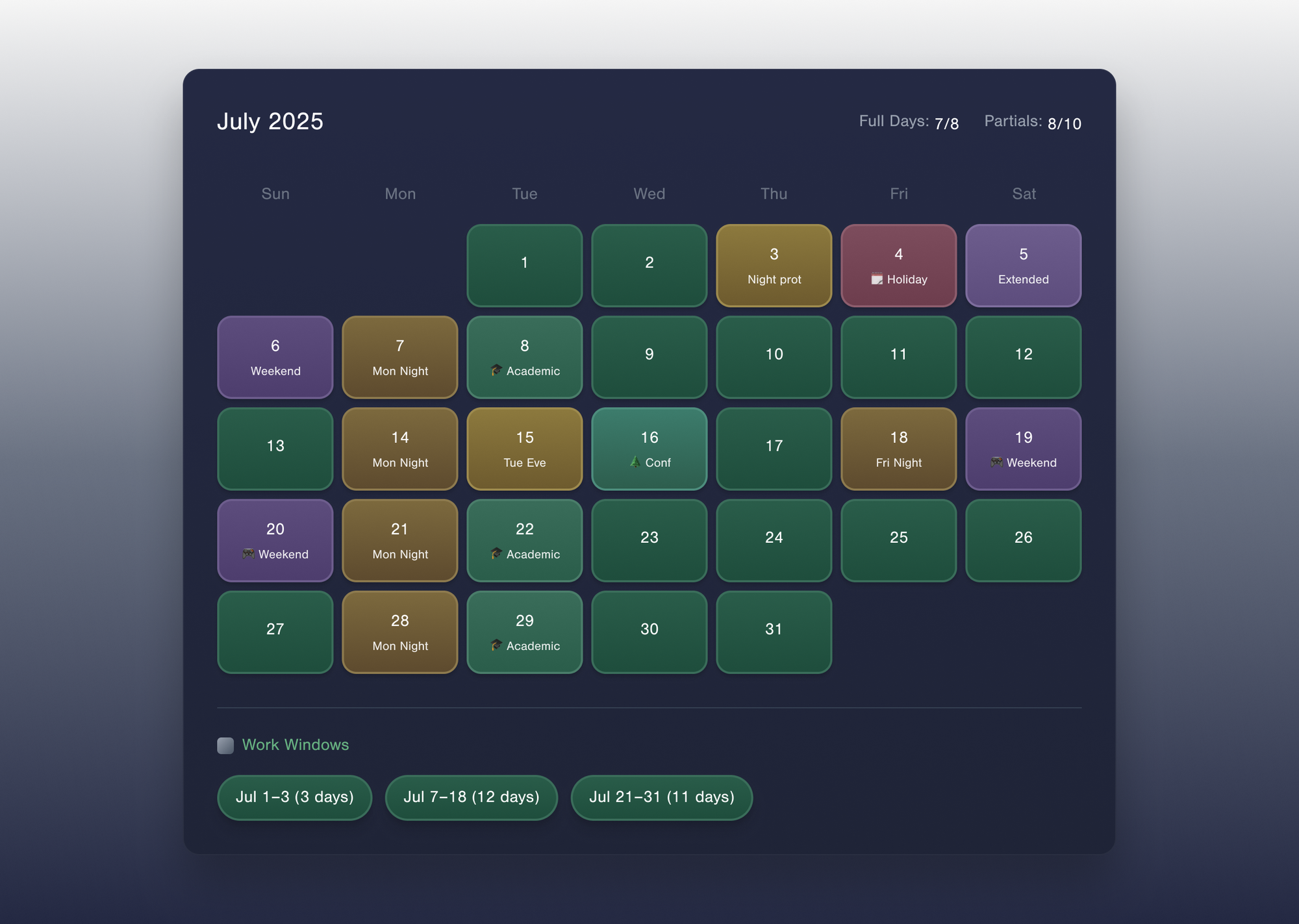
- Review the output. The AI generates a prioritized list of requests, formatted for QGenda, with notes on which tier each request serves. An HTML file is created that helps visualize my potential schedule based on the proposed requests.
- Submit and adjust. I plug the requests into QGenda and wait for the draft schedule.
The magic isn’t that the AI makes perfect decisions. It’s that the AI helps me think more systematically. By encoding my preferences into a reusable skill, I’m not starting from scratch every quarter. The cognitive load drops. The decisions get easier.
Why This Matters Beyond Scheduling
This project taught me something bigger about working with AI. The real power isn’t in asking the AI to solve your problem. It’s you, just faster.
Agent Skills are still early. The tooling will get better. But the pattern is clear: encode your expertise into modular, reusable instructions, and the AI becomes an extension of your thinking rather than a replacement for it.
If you’re an emergency physician drowning in scheduling chaos, you don’t have to build exactly what I built. But you might consider: what are the constraints you’re constantly juggling? What’s your tiered priority system? And what would it look like to hand that logic to an AI and see what it comes back with?
Start with Tier 1. Write down what’s non-negotiable. That’s the foundation. Everything else builds from there.